

What is Retrieval Augmented Generation (RAG): A simple guide with analogies


April 19, 2026
Before discussing the Retrieval-Augmented Generation (RAG) pipeline, it helps to ask a simple question: what exactly goes wrong when you use a foundation model on its own?
Most teams see familiar patterns:
- The model hallucinated details that do not match reality.
- It did not know the internal data.
- You could not easily update its knowledge without retraining a model.
Imagine your company has product docs, support tickets, and internal guides. You ask a foundation model a question like “Does our enterprise plan support SSO with provider X?” The model has no idea what your plan actually includes, so it guesses based on patterns from the general internet. Sometimes it is close. Sometimes it is dangerously wrong.
You need a way to give the model fresh, trusted context when the question is asked. You also need a way to do this without retraining a model every time your documentation changes.
This is the idea behind RAG pipelines.
What is a RAG pipeline?
A RAG pipeline (Retrieval-Augmented Generation pipeline) is a system that helps an AI model answer questions using your own data, not just what it learned during training.
Instead of asking the model to “know everything,” you let it:
- Retrieve the most relevant pieces of your own data for a given question, on the fly.
- Augment the prompt so the model answers with that context in front of it.
RAG with an Analogy
RAG is just a simple idea wrapped in a new language. Here is the pattern in plain English.
- You start with your documents
- You break them into small, readable pieces
- You convert each piece into a mathematical representation called an embedding
- You store those embeddings in a vector database
That is the library.
When a user asks a question:
- You convert the question into an embedding
- You search the vector database for the closest matches
- You retrieve the pieces most likely to contain the answer
That is the librarian.
Then you pass the question and those retrieved pieces into a language model.
- The model uses your data as context
- The answer becomes grounded, not guessed
That is the storyteller.
This is why RAG matters: it gives your model something it does not naturally have. Access to your data, at the moment it is needed.
Key stages of a RAG pipeline
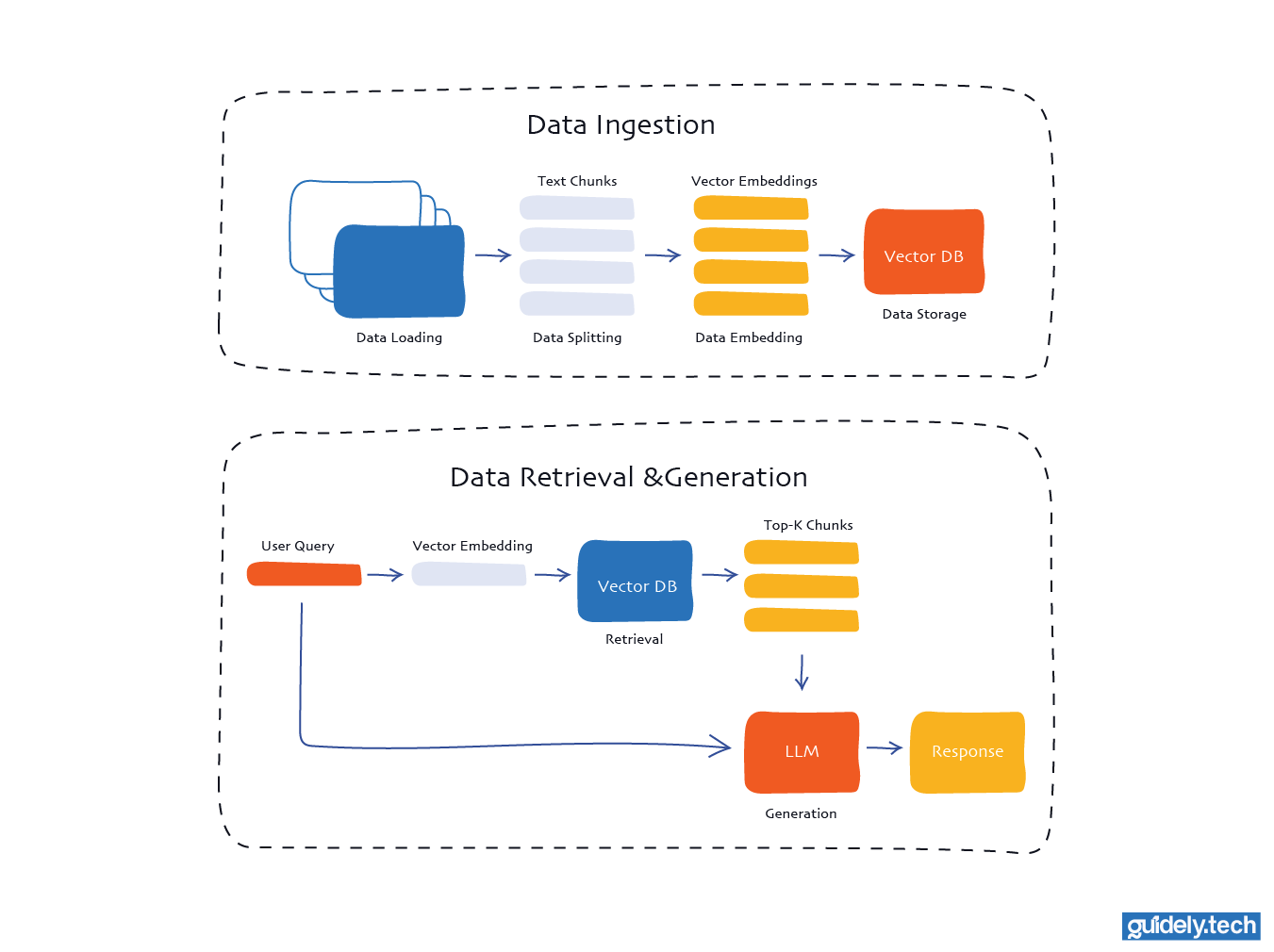
Key stages of a RAG pipeline
Stage 1: Data ingestion
This stage answers the question “What information should my model have access to?”
Typical sources include product documentation, knowledge base articles, Notion pages, Confluence spaces, PDFs in cloud storage, or support tickets. During ingestion, you:
- Load data: This is the stage where you connect to your chosen source and pull in the documents you want the system to work with. It could be files, pages, or any other text-based content your pipeline relies on.
- Split data: Long documents are split into smaller segments to make them easier for the model to process. These pieces are usually kept below a specific size, for example, around 500 characters, to make retrieval more precise.
- Embed data: Each chunk of text is transformed into a vector using an embedding model. This converts the text's meaning into a numerical form that the system can compare and work with.
- Store data: The vectors are then placed into a vector database. This allows users to quickly find the most relevant chunks when they ask a question.
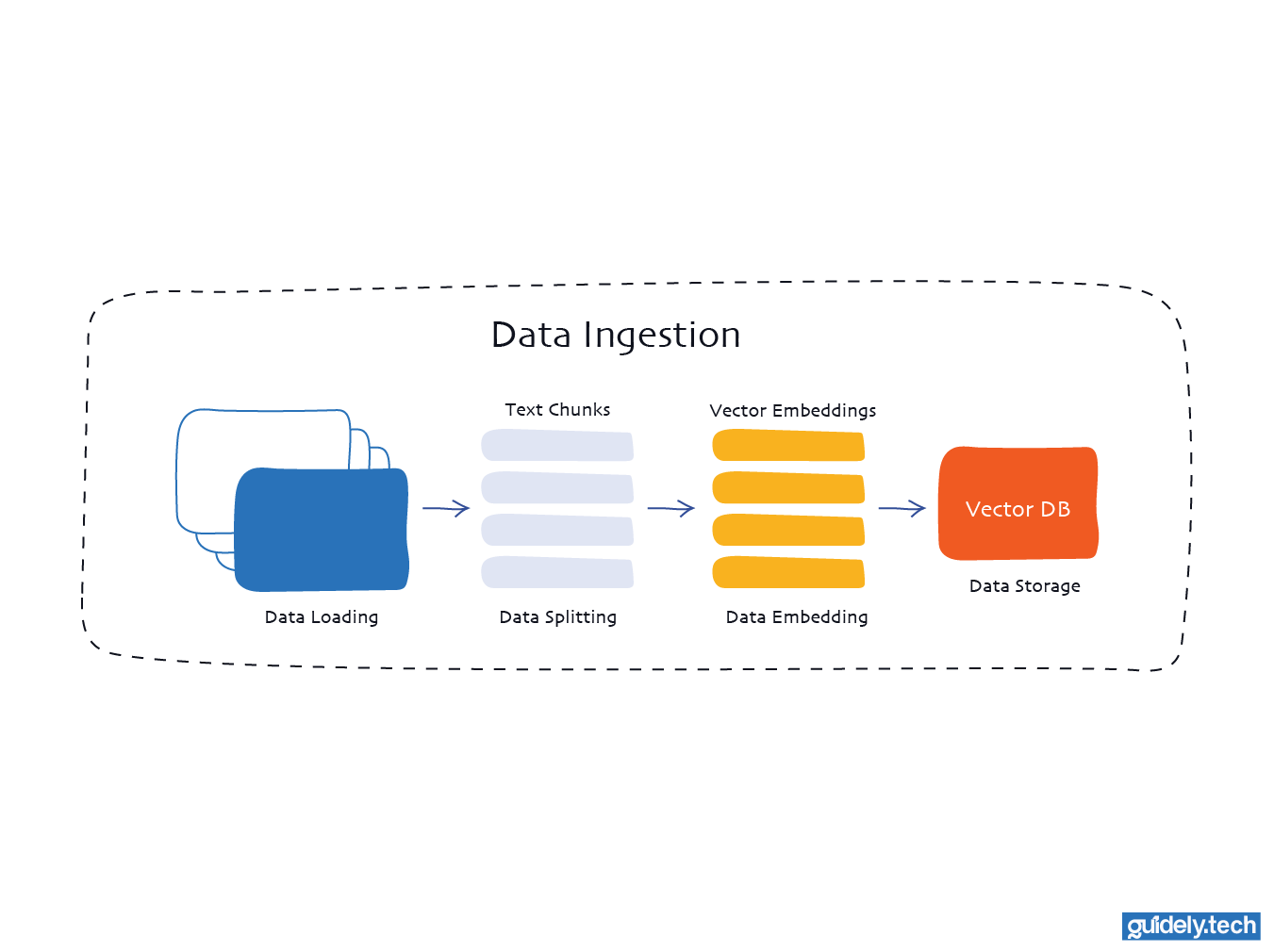
Stage 1: Data ingestion
Stage 2: Retrieval, augmentation, and generation
- Retrieval: When a user asks a question, the system converts that question into a vector using the same embedding model used during ingestion. This query vector is then compared against all vectors in the database to find the closest matches. These matches represent the pieces of text most likely to contain helpful information for answering the question.
- Generation: The language model receives two things. The user’s question and the relevant text retrieved from the vector database. It combines both inputs to produce a grounded response, using the retrieved information as context for the answer.
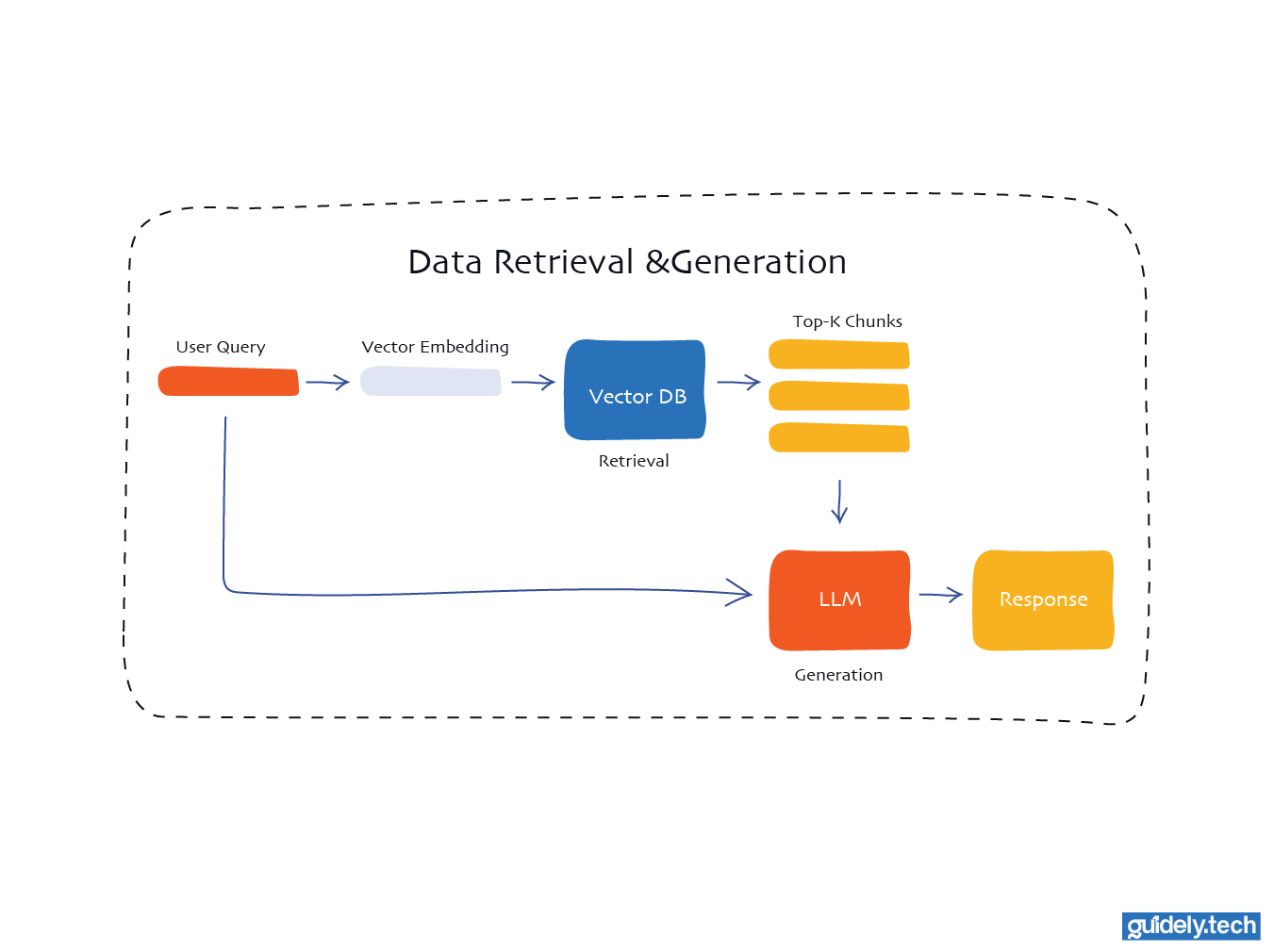
Stage 2: Retrieval and generation
Conclusion
At its core, RAG is not a complicated idea. It is a shift in how we use language models.
Instead of expecting the model to know everything, we give it the right information at the right time. That is the entire system. Retrieve what matters, add it to the prompt, and let the model answer with context.
This small change has a big impact. A model that once guessed can now answer using real, trusted information. A system that was static becomes dynamic, updating as your data changes.
Going further
If you want to go further, a few resources will help:
- If you’re looking for a structured path to learning AI engineering from the ground up, start with our guide on breaking into AI engineering
- If you are still getting familiar with the core AI terminologies, watch our YouTube video comparing AI, Machine Learning, Deep Learning, and Generative AI
- If you want to understand what is happening under the hood, our Neural Networks series breaks things down step by step
Enjoyed the read? Help us spread the word — say something nice!